the power of `screenshot`
Oh fuck yea
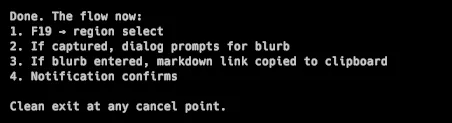
I just hijacked the osx screenshot to dump it directly into a folder, with a custom folder / name, AND copy a Astro relative markdown link to the clipboard.
I’ve always loved the Screenshot to Clipboard command and bound that to cmd-shift-5 forever. It earns a place in my muscle memory every day. Well, now it’s on F20, but I digress. It’s something I use constantly, snap a pic, drop it into Slack or a doc, gtg.
It doesn’t always work, terminal programs don’t all accept image pasting ( lol, my expectations are too high ).
Here was my challenge. I’m writing this in Obsidian, because I like Obsidian for my knowledge work. However, the publishing of this information is done via Astro. I setup an rsync to copy the markdown over, but I still had no decent workflow for adding images to posts. If I paste a screenie into Obsidian, the file remains in Obsidian, in a media directory, not publishable in Astro without other steps.
Yea, that screenshot is not inline in Obsidian, I can’t see it while I’m writing and I’m ok with that. Obsidian would force ALL my media to end up in my blog folder, and that’s not cool.
EDIT: Figured it out. Saving the screenshot to the blog folder, then doing a bidirectional rsync to save content from Obsidian > Astro, and pull screenshots from Astro > Obsidian.
Being able to take a region screenshot, and end up with a LINK to that screenshot that’s in my blog. This is starting to feel like the future. Here’s the script. ( spaces are my workspaces )
#!/usr/bin/env bash
# blog-screenshot.sh
# Interactive region screenshot saved to blog assets, organized by space name
#
# Responsibilities:
# - Get current yabai space name
# - Create destination folder if needed
# - Capture region selection to timestamped file
# - Prompt for alt text blurb
# - Copy markdown link to clipboard
export PATH="/opt/homebrew/bin:/usr/local/bin:$PATH"
BLOG_ASSETS="$HOME/projects/prototypologist/src/content/blog/screenshots"
SPACE_NAMES_CONF="$HOME/dotfiles/config/yabai/space-names.conf"
# Get current space index
space_index=$(yabai -m query --spaces --space | jq '.index')
# Look up space name from conf, fallback to "space-N"
space_name=$(grep "^${space_index}=" "$SPACE_NAMES_CONF" | cut -d'=' -f2)
space_name="${space_name:-space-${space_index}}"
# Create destination folder
dest_folder="${BLOG_ASSETS}/${space_name}"
mkdir -p "$dest_folder"
# Generate timestamp
timestamp=$(date +"%Y-%m-%d_%H%M%S")
temp_file="${dest_folder}/${timestamp}.png"
# Interactive region capture
screencapture -i "$temp_file"
# Exit if user cancelled (file not created)
[[ ! -f "$temp_file" ]] && exit 0
# Prompt for blurb
blurb=$(osascript -e 'display dialog "Screenshot blurb:" default answer "" buttons {"Cancel", "OK"} default button "OK"' -e 'text returned of result' 2>/dev/null)
# Exit if cancelled
[[ -z "$blurb" ]] && exit 0
# Sanitize blurb for filename: lowercase, spaces to dashes, strip special chars
blurb_slug=$(echo "$blurb" | tr '[:upper:]' '[:lower:]' | tr ' ' '-' | tr -cd 'a-z0-9-')
# Rename file with blurb
filename="${timestamp}_${blurb_slug}.png"
dest_file="${dest_folder}/${filename}"
mv "$temp_file" "$dest_file"
# Generate markdown link relative to assets folder
markdown_link=""
# Copy to clipboard
echo -n "$markdown_link" | pbcopy
osascript -e "display notification \"Copied: ${blurb}\" with title \"Screenshot Ready\""